

Add SDK examples
Add SDK code samples to your API documentation with the x-codeSamples OpenAPI extension or automatically with Speakeasy.
If your users interact with your API through an SDK rather than direct network requests, add SDK code samples with the x-codeSamples extension. Mintlify displays these samples on your OpenAPI pages.
You can write these samples yourself. If you generate your SDKs with Speakeasy, Speakeasy can add the samples to your spec automatically.
Add examples manually
Section titled “Add examples manually”Add the x-codeSamples property to any request method. It has the following schema.
-
lang(string, required) — The language of the code sample. -
label(string) — The label for the sample. This is useful when providing multiple examples for a single endpoint. -
source(string, required) — The source code of the sample.
The following example shows code samples for a plant tracking app that has both a Bash CLI tool and a JavaScript SDK.
paths:
  /plants:
    get:
      # ...
      x-codeSamples:
        - lang: bash
          label: List all unwatered plants
          source: |
            planter list -u
        - lang: javascript
          label: List all unwatered plants
          source: |
            const planter = require('planter');
            planter.list({ unwatered: true });
        - lang: bash
          label: List all potted plants
          source: |
            planter list -p
        - lang: javascript
          label: List all potted plants
          source: |
            const planter = require('planter');
            planter.list({ potted: true });
Generate examples with Speakeasy
Section titled “Generate examples with Speakeasy”If you generate your SDKs with Speakeasy, you can pull its autogenerated snippets into your API reference instead of maintaining them by hand. The snippets appear in the interactive playground alongside your endpoints.
Get the combined spec URL from the registry
Go to your Speakeasy Dashboard and open the API Registry tab. Open the
*-with-code-samplesentry for your API.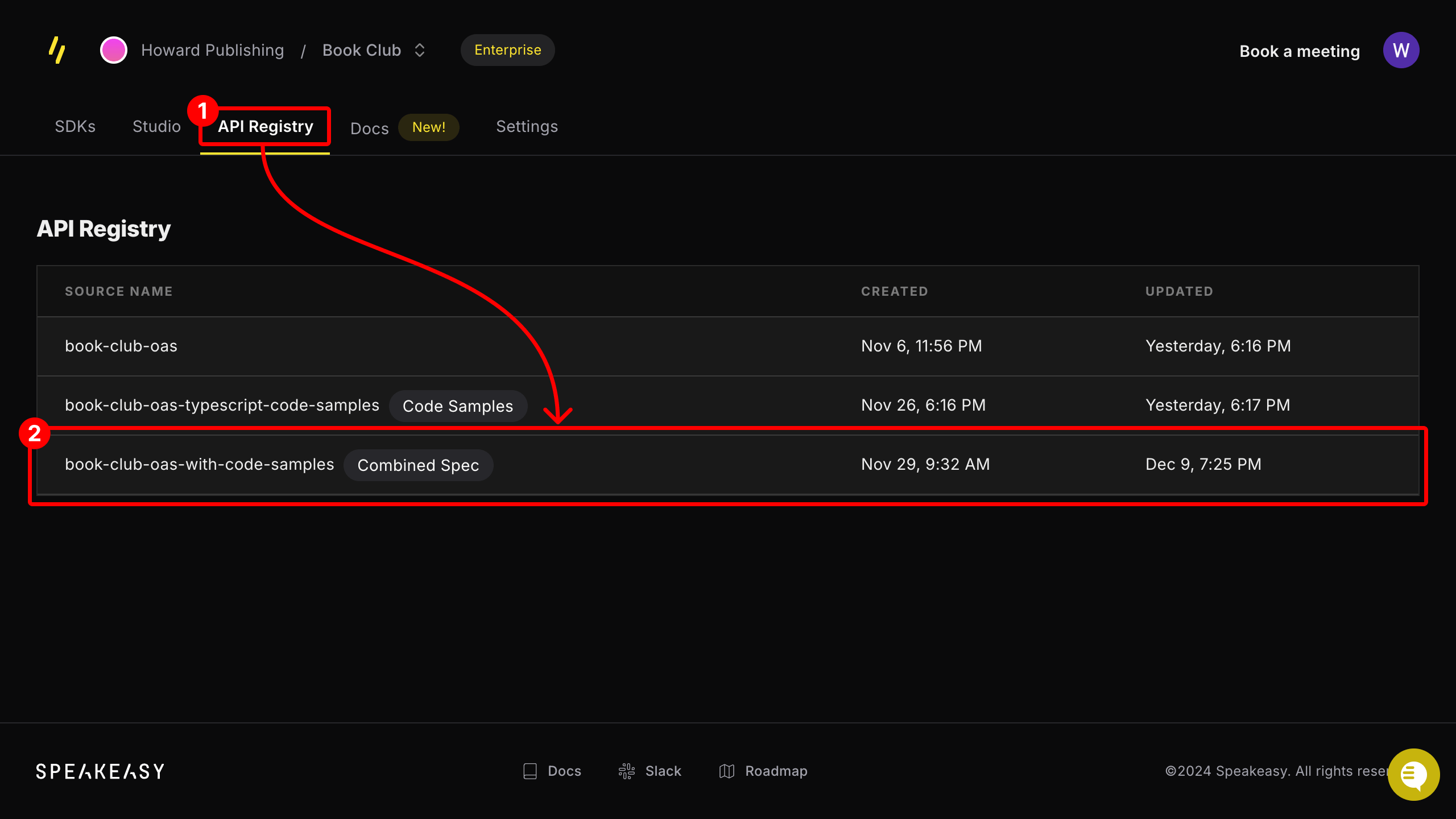
From the registry entry's page, copy the provided public URL.
Add the combined spec URL to your `docs.json` file
Add the combined spec URL to an anchor or a tab in the
navigationobject of yourdocs.jsonfile.Anchor { "navigation": { "anchors": [ { "anchor": "API reference", "icon": "square-terminal", // !mark "openapi": "SPEAKEASY_COMBINED_SPEC_URL" } ] } }Tab { "navigation": { "tabs": [ { "tab": "API reference", // !mark "openapi": "SPEAKEASY_COMBINED_SPEC_URL" } ] } }Verify the integration
After you redeploy your documentation, open any endpoint in your API reference and confirm that language snippets appear in the playground. The set of available languages matches the SDK targets configured in your Speakeasy project.
If snippets do not appear, check that:
- The
openapiURL indocs.jsonpoints to the*-with-code-samplescombined spec entry, not the source OpenAPI file. - The combined spec URL is publicly reachable from the browser.
- Your Speakeasy project has an automated code sample URL configured and at least one SDK target enabled.
- The